
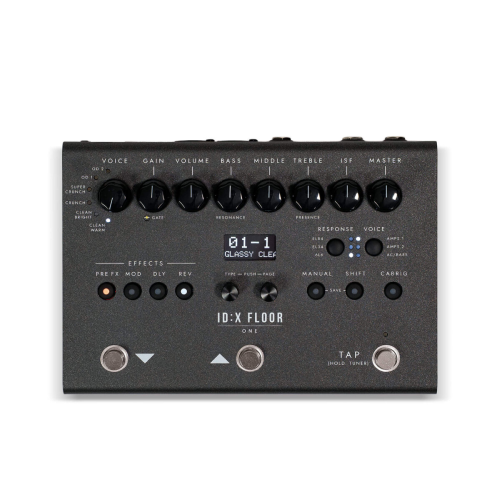
Blackstar ID:X Floor One
Blackstar ID:X Floor One Multi-Effects
In Stock! Available for delivery!
$330.00
Code: BLKIDXFLOOR1
Brand: 
Description
Blackstar ID:X Floor One Multi-Effects & Amp Modeler
Overview
Take ultimate amp-modeling versatility and studio-quality effects anywhere you go with the Blackstar ID:X Floor One. Packed into a rugged, stage-ready floorboard enclosure, the ID:X Floor One combines Blackstar’s acclaimed tone-shaping power—including patented ISF (Infinite Shape Feature) and advanced CabRig speaker simulation—with an intuitive control layout designed for both live performance and direct recording.
Whether you need pristine, glassy cleans, crunchy rhythm tones, or high-gain lead saturation, the ID:X Floor One gives you instantaneous access to pro-tier guitar tones right at your feet.
Key Features
-
6 Distinct Amp Voices: Select from Clean Warm, Clean Bright, Crunch, Super Crunch, OD 1, and OD 2 to cover every musical genre from jazz and blues to classic rock and modern metal.
-
Patented ISF Control: Dial seamlessly between American-style tightness and punch, and British-style warm, aggressive character using Blackstar’s Infinite Shape Feature.
-
Tube Response Power Amp Emulation: Experience authentic power tube feel and dynamics with selectable power amp responses (EL84, EL34, and 6L6).
-
Comprehensive Onboard Effects Engine: Features 4 dedicated FX blocks (Pre FX, Modulation, Delay, and Reverb) with tap-tempo capability for quick time-based adjustments.
-
CabRig DSP Technology: Advanced IR-based speaker cabinet and room simulation allowing you to send mix-ready direct tones straight to a PA, audio interface, or headphones.
-
Stage-Ready Hardware: Features a crisp digital display for preset navigation, ultra-durable footswitches for preset scrolling and tap-tempo/chromatic tuner activation, and tactile top-panel knobs for real-time tone tweaking.
Specifications & Front Panel Controls
| Control Group | Controls / Features |
| Amp Voices | Clean Warm, Clean Bright, Crunch, Super Crunch, OD 1, OD 2 |
| EQ & Tone | Gain, Volume, Bass, Middle, Treble, ISF, Master |
| Power Tube Response | EL84, EL34, 6L6 |
| Effects Engine | Pre FX, Modulation (MOD), Delay (DLY), Reverb (REV) |
| Navigation & Utility | Digital LCD Screen, Manual Mode, Shift Function, CabRig Direct Out |
| Footswitches | Preset Down ($\boldsymbol{\triangledown}$), Preset Up ($\boldsymbol{\triangle}$), Tap Tempo / Hold for Tuner |
Need an Expert Advice?
Call Us Today!+961 (01) 202 302